A finance team receives the same twenty-odd invoices every month, in twenty-odd different shapes. One vendor sends a clean PDF with a table. Another sends a scanned copy with the PO number pencilled into the margin. Someone keys all of it into the ERP by hand, chases three suppliers for a missing GST number, and closes the books three days later than planned.
This is the problem document AI is sold to solve. Pitched correctly, it solves part of it. Pitched as a blanket fix for "paperwork", it gets bought for documents it was never going to help with, and the project stalls at the first exception-heavy batch.
What does document AI actually do with invoices and paperwork?
It reads a document, pulls out specific fields, and checks those fields against what your systems already know. That is the whole job, and it is narrower than most pitches suggest.
A typical pipeline combines optical character recognition with a trained model that understands document structure, not just characters on a page. It identifies the invoice number, the vendor, the line items, the tax amount, and the PO reference, then hands that structured data to a validation step. Databricks describes this as moving from flat text recognition to understanding layout and context, which is what lets the system tell a line-item table apart from a payment-terms paragraph on the same page (Databricks, "What is Document AI?").
Stampli's breakdown of invoice processing is useful here because it names the four steps most vendors compress into one word, "automation": extraction, validation, coding, and routing (Stampli). Extraction gets the data out. Validation checks it against a purchase order and a goods receipt. Coding assigns it to the right cost centre or GL code. Routing sends it to the right approver, or flags it for review. Each of those four steps has a different failure mode, and that matters when you are scoping a project.
Where does document AI save real time, and where does it not?
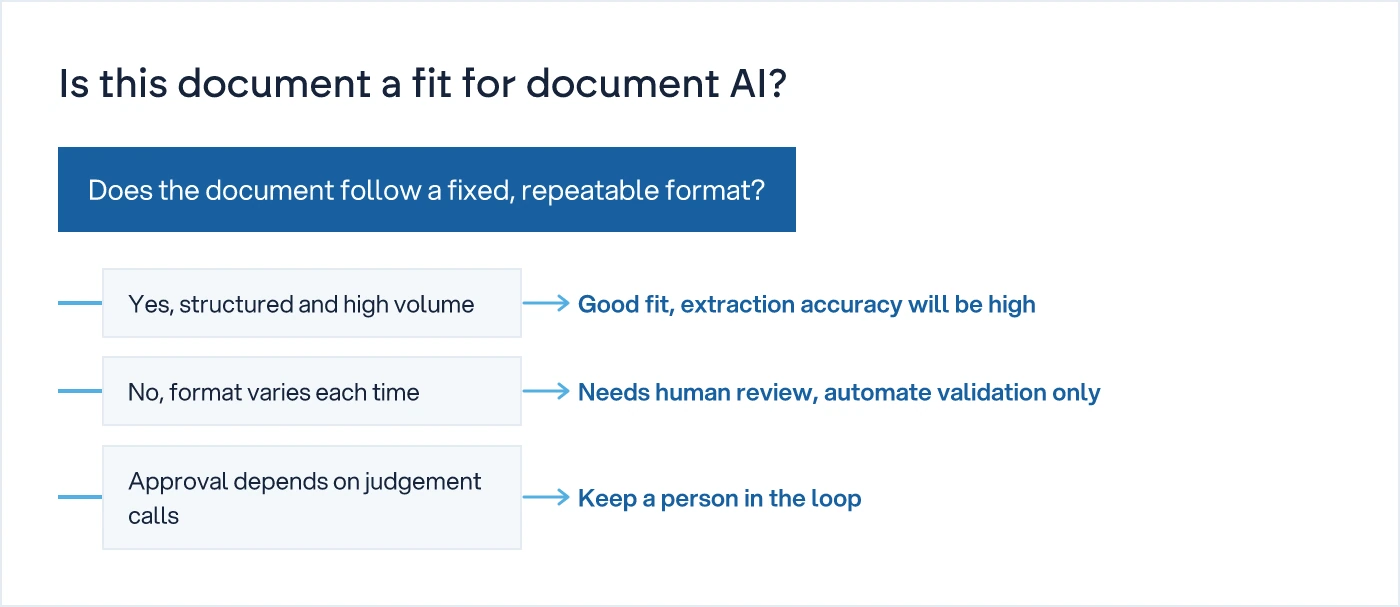
It saves time where the document format is consistent and the decision is a match, not a judgement call. It saves little time where the format varies or the decision needs context a model does not have.
An invoice from a regular vendor, in a format that repeats every month, is close to the ideal case. The model has seen the layout before, extraction accuracy is high, and the validation step is a straightforward three-way match: does the invoice agree with the PO and the GRN. Most of that can run with no person involved until something does not match.
A scanned invoice from a one-off vendor, in a format the model has never seen, is a different case entirely. Extraction accuracy drops, the system flags lower confidence, and a person has to check the output anyway. You have replaced typing with checking. That is not nothing, but it is not the time saving the pitch promised.
Contracts, correspondence, and anything where the real output is a decision rather than a data match sit at the far end. A renewal clause or a liability term needs a reading, not an extraction. IBM's framing of agentic document workflows is relevant here: once a document needs judgement, the useful role for AI is to retrieve the relevant clause and present it, not to decide (IBM, "Turn document processing into an agentic workflow"). If the answer needs a phone call, it's not a system.
| Document type | How consistent is the format | What decision sits behind it | Fit for document AI |
|---|---|---|---|
| Invoices from repeat vendors | High, same layout each cycle | Does it match the PO and GRN | Strong fit |
| Invoices from one-off vendors | Low, layout changes every time | Same match, harder to extract | Needs human review |
| Delivery challans and GRNs | Medium, varies by transporter | Does quantity match the PO | Moderate fit |
| Purchase orders you issue | High, generated by your own ERP | Approval before release | Already structured, automate the approval step instead |
| Contracts and agreements | Low, long-form text | Terms, liability, renewal dates | Weak fit, better used for search than automation |
How do you scope document AI before you buy it?
You map the actual paper trail first, document by document, and ask where the delay really sits. Buying the tool before doing this is how firms end up automating the twenty percent of invoices that were never the problem.
Start by sorting every recurring document type into three buckets: fixed-format and high-volume, variable-format and high-volume, and anything where a person has to make a judgement call regardless of what the document says. The first bucket is where document AI earns its cost quickly. The second needs a review queue built into the process from day one, not bolted on later. The third should not be automated at all, because the bottleneck is a decision, not paperwork.
We understand how your business actually works first, then we design the system. That means watching where an invoice actually sits for four days before it reaches an approver, not assuming the ERP log tells the full story. Often the delay is not extraction. It is a single approver who only clears invoices on Friday afternoon. Document AI will not fix that. Do not automate a bad process; fix the approval rule, then decide what to automate.
What does a typical document AI pipeline look like end to end?
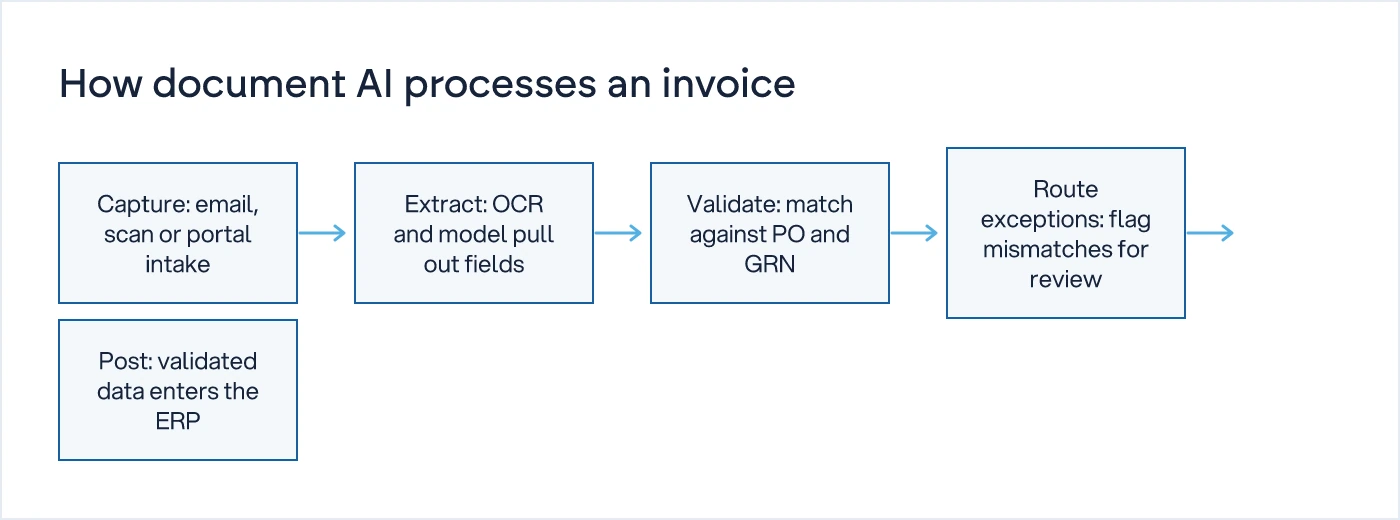
Most working pipelines follow five steps: capture, extract, validate, route exceptions, and post. The shape rarely changes, even when the vendor's marketing language does.
Capture brings the document in, by email, scan, or a vendor portal. Extraction pulls the fields using OCR and a trained model. Validation checks those fields against the PO and GRN already in your system, which is the step that catches a wrong quantity or a duplicate invoice number before it reaches a ledger. Anything that fails validation gets routed to a person, with the specific mismatch flagged rather than the whole document dumped on their desk. What passes validation posts straight to the ERP.
The routing step is where most of the real time saving happens, because it narrows a reviewer's attention to the three invoices that do not match, out of three hundred that already do.
How does this fit with an existing ERP or invoicing platform?
It sits as a layer in front of the ERP, not a replacement for it, and the integration is what determines whether the time saving is real or just moved to a different screen.
SAP's own community writing on this is a useful technical reference: combining SAP's Employee Self-Service tools with document AI and S/4HANA lets an extracted invoice flow into the existing approval chain without a separate login or a manual re-entry step (SAP Community, "How SAP ESM + Document AI + S/4HANA Work Together"). The principle holds outside SAP too. Whether you run Zoho, Tally, NetSuite, or a custom system, the question is the same: does the extracted data post directly into the record the approver already works from, or does it land in a side dashboard nobody checks. The second pattern is common, and it is why some document AI rollouts look live but change nothing in practice.
Should you build, buy, or extend what you already have?
For most back-office teams, extending an existing platform's document AI module is faster and cheaper than building a custom pipeline, provided your document volume and format variety match what that module was designed for.
Buying a dedicated document AI tool makes sense when invoice volume is high, formats are reasonably consistent, and the ERP already has a clean API to post into. Building a custom pipeline makes sense when your document mix is unusual, for example a logistics business reading bills of lading, customs forms, and delivery challans in three different formats from three different countries. Extending what you already run makes sense when the ERP vendor has a document AI module and your main gap is simply that nobody has switched it on and mapped it to your approval chain.
More on how AI tools are actually landing in day-to-day operations, rather than in vendor demos, is covered in the Technology and Trends hub.
What to do next
Before evaluating a document AI vendor, pull a month of invoices, challans, and purchase orders and sort them by format consistency and decision type, the way the table above does. That sort alone will tell you which twenty percent of your paperwork is worth automating now, and which eighty percent needs a process fix first, not a tool.
If you want that mapped against your actual systems and approval chain rather than a generic checklist, our digital transformation service starts with exactly this kind of scoping. The first conversation is a free 30-minute call, and it stays a scoping conversation, not a sales pitch for a tool you have not yet decided you need.